We are starting a series of articles in which we share a summary of the OPSEC practices to be taken into account on the red team side, and the detection strategies that can be put in place by SOC teams to detect certain advanced techniques based on the Kerberos protocol.
Red teaming exercises simulate adversaries in order to:
- identify compromised paths enabling access to sensitive assets;
- evaluate & improve existing detection and response systems and procedures.
In order to challenge the Blue Team, the Red Team must be discreet in achieving its objectives (eg: getting customer data, AWS tenant, Active Directory domain, etc.). Red Team operators must therefore master the tools and techniques they use, and be able to modify them to leave as few traces as possible.
The term OPSEC (Operations Security) is used to describe the difficulty with which the red team's actions can be detected by the blue team.
Intrinsec's RedTeam
Intrinsec's RedTeam is dedicated to this activity, and uses its skills to perform Red Teaming exercises of varying lengths, from a few weeks to a few months, or in a more original setting through its «Trophy Hunter» model, to extend the exercise over a year and use new exploits and opportunities as they arise. The business leverages the work of the CTI team, shares common tools and invests significant R&D time around its methods, tools and technical means to achieve its goals. The team also frequently collaborates during Purple Teaming exercises with detection & response teams to improve the efficiency of detection resources or operational business practices.
What is Kerberos?
Kerberos is one of the authentication systems available in Active Directory environments. This protocol enables users and machines to authenticate themselves on the network and access services in an authenticated way. Kerberos is based on the use of Ticket Granting Ticket (TGT) and Ticket Granting Service (TGS).
In this article, we won't go into how the Kerberos protocol works. An explanation can be found on the following blogpost: https://beta.hackndo.com/kerberos/.
During our RedTeams, we come across situations where the use of attack techniques based on the Kerberos protocol are detected when carried out with known tools (eg impacket suite, Rubeus, etc.). We have adapted our techniques and tools to get under the Blue Team's radar, and then extended our recommendations to improve our customers' detection strategies.
Disclaimer:
- We will only be discussing the traces and effects of our actions in relation to Kerberos protocol techniques. Memory escape, signature escape, etc. will not be considered;
- This article is not aiming to explain attack techniques, nor recommendations for correcting configuration faults. Here, we concentrate on OPSEC considerations and detection strategies.
Kerberos attacks
Kerberos is subject to a number of interesting actions from an attacker's point of view. A number of attacks and techniques can be carried out to exploit various scenarios such as:
- Kerberoasting and ASREPRoasting
- Golden Ticket/Silver/Diamond Tickets
- Delegation exploitation (constrained and unconstrained)
- Lateral movement
- Etc.
Supported encryption types
To date, Active Directory offers five possible encryption suites for encrypting ticket secrets (may be subject to changes in the future):
- DES_CBC_CRC
- DES_CBC_MD5
- RC4-HMAC-MD5 (enctype 23)
- AES128-CTS-HMAC-SHA1-96 (enctype 17) – with 4096 PBKDF2 HMAC-SHA1 rounds
- AES256-CTS-HMAC-SHA1-96 (enctype 18) – with 4096 PBKDF2 HMAC-SHA1 rounds
Since Windows 2008 R2, DES is disabled on all created accounts (but can be enabled for backward compatibility reasons). By default, the RC4_HMAC_MD5 algorithm is used for domain user accounts secret encryption (AES128 and AES256 can be enabled but are not enabled by default, for backward compatibility reasons), with the exception of the krbtgt account secret, used to encrypt TGT, which is encrypted by default in AES if the domain's functional level is 2008 or higher (and its password has been changed after upgrading to 2008 or higher). Note that for domain computer accounts, AES is the default.
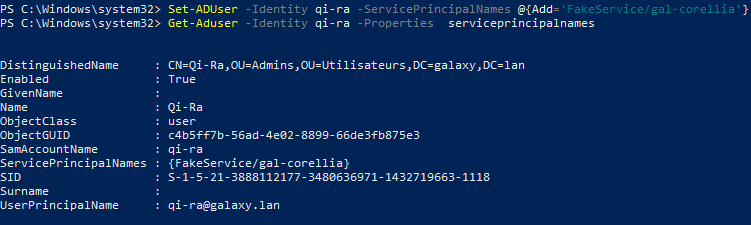
To demonstrate this, we will add an SPN to the GALAXY\Qi-Ra account:
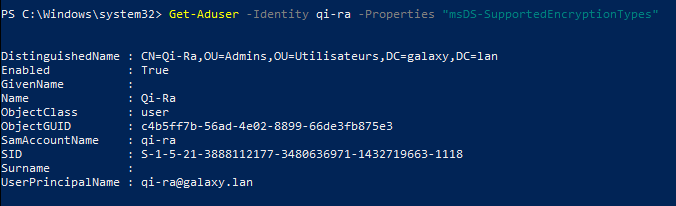
If we query the msDS-SupportedEncryptionTypes attribute, it will not appear:
However, if we check in the advanced account options via the admin console, we can see that AES and DES are not enabled:
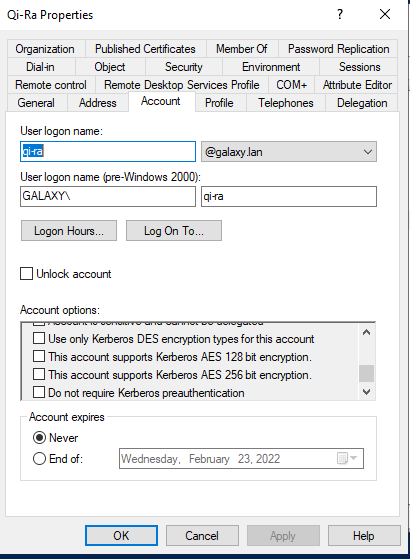
This means that RC4 is used by default. In order to use the most secure algorithms (AES128 and AES256), it is necessary to check the corresponding boxes, which can be seen in the advanced options of the GALAXY\R5-D4 account:
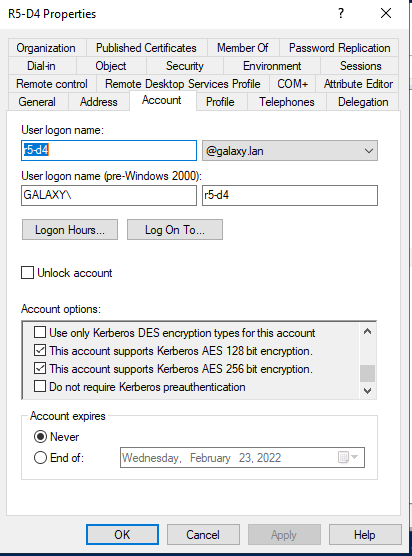
Thus, if we require the msDS-SupportedEncryptionTypes attribute:
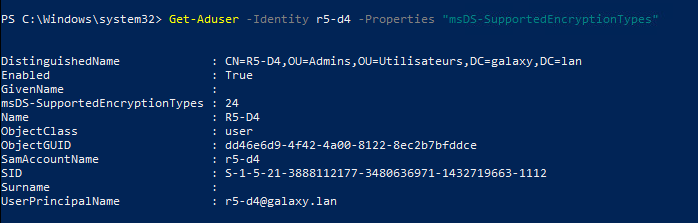
We can see that it is indeed present and that its value is 24, which corresponds to the support of:
- AES128
- AES256
If the account only supported AES256, the value would be 16.
So when we request a ticket for the service associated with this account, we'll be able to choose the algorithm to be used, knowing that by default the proposed highest will be used, in this case AES256.
For more details, see the Microsoft official documentation.
Ticket options
Ticket requests have a number of possible options depending on the needs a user or application might have. These options are represented on 32 bits, each bit corresponding to the flag of a different option. The options are as follows:
| Bit | Flag |
| 0 | Reserved |
| 1 | Forwardable |
| 2 | Forwarded |
| 3 | Proxiable |
| 4 | Proxy |
| 5 | Allow Postdate |
| 6 | Posted |
| 7 | Unused |
| 8 | Renewable |
| 9 | Unused |
| 10 | Unused |
| 11 | Optional Hardware Authentication |
| 12 | Unused |
| 13 | Unused |
| 14 | Canonicalize |
| 15 | Undefined |
| 16 | Undefined |
| 17 | Undefined |
| 18 | Undefined |
| 19 | Undefined |
| 20 | Undefined |
| 21 | Undefined |
| 22 | Undefined |
| 23 | Undefined |
| 24 | Undefined |
| 25 | Undefined |
| 26 | Disabled Transited Check |
| 27 | Renewable OK |
| 28 | Encrypt Ticket in Server Key |
| 29 | Undefined |
| 30 | Renew |
| 31 | Validate |
It's important to know that ticket options are encoded in big endian, so the first bit of the string will be the first bit on the left.
In an ordinary ticket request, the following option string can be seen in the ticket request:
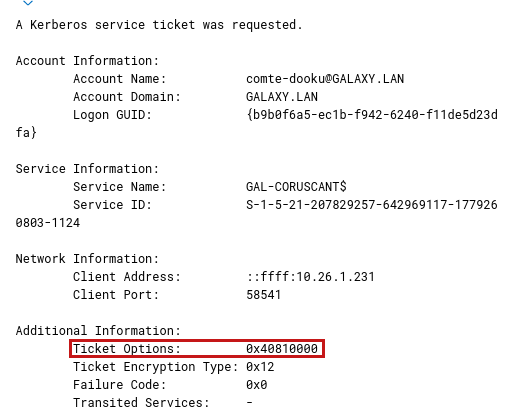
If we transform 0x40810000 into binary, it will give, in big endian:
01000000 10000001 00000000 00000000
Then read this from left to right to obtain the following options (starting from 0):
- 1: Forwardable
- 8: Renewable
- 15: Canonicalize
For more details, check the corresponding RFC.
Demo context
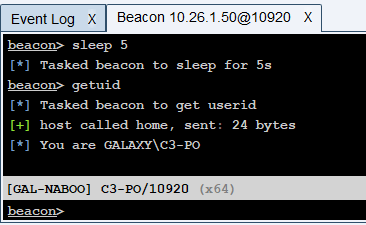
Unless explicitly stated otherwise, the GALAXY.LAN domain user account we'll be using for the demos is C3-PO. This user is not a local administrator on the victim machine (GAL-NABOO). The actions are performed from a Cobalt Strike agent running on this machine:
The Rubeus tool will be launched with the execute-assembly function (principle of Fork & Run) in the WerFault.exe sacrificial process:

We cleared the cache so that no tickets were initially present for the C3-PO user:
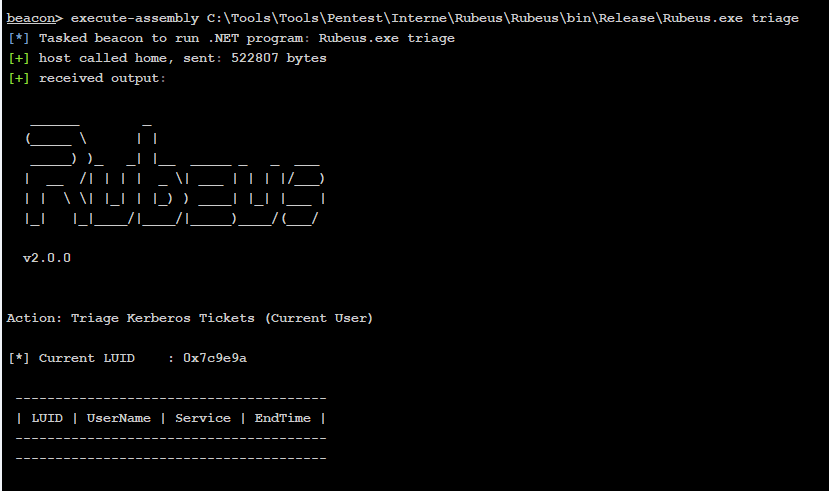
Log configurations
WARNING : The configurations mentioned here are only applicable to a lab environment as they can produce a very big amount of logs and thus can be difficult to analyze a in real scenario. They should be heavily modified to be usable in a production environment.
Domain controller
In order to enable the correct Active Directory logs, some configuration is necessary as they are not enabled by default.
First of all, you need to activate the advanced auditing policy. To do this, in an administrator command prompt, type gpmc.msc, which will open the following window:
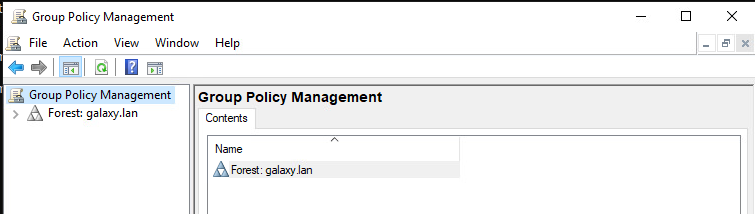
Then go to Group Policy Management -> Forest: -> Domains -> -> Domain Controllers and right-click on Default Domain Controllers Policy, then click on Edit:
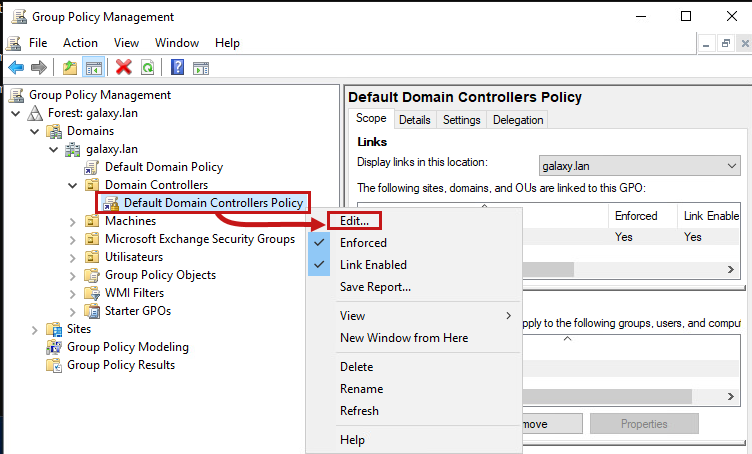
It will open the following window:
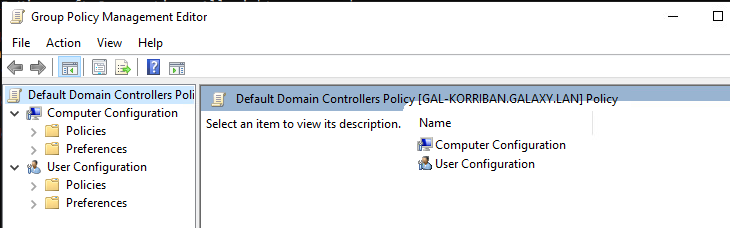
Then go to Computer Configuration -> Policies -> Windows Settings -> Security Settings -> Advanced Audit Policy Configuration -> Audit Policies:
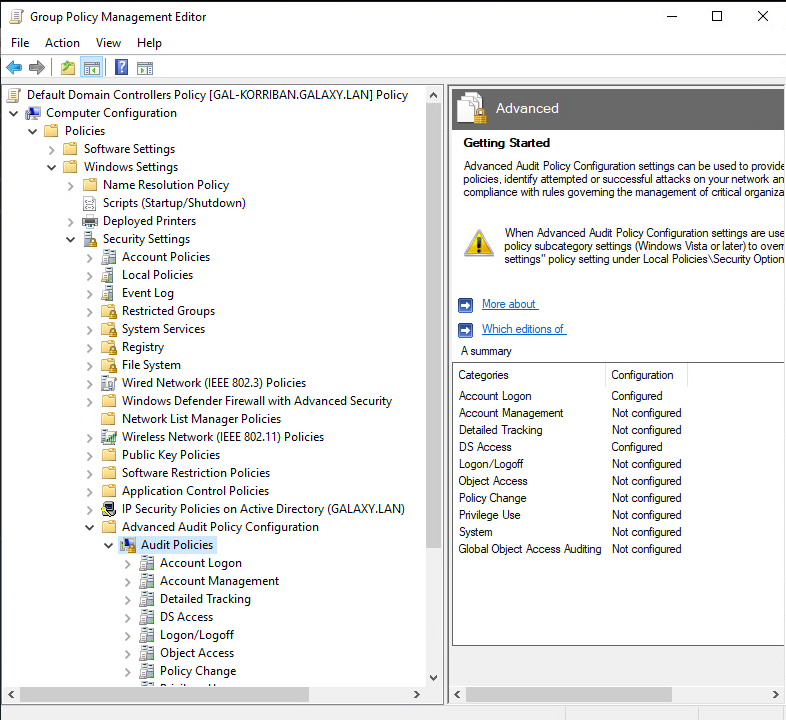
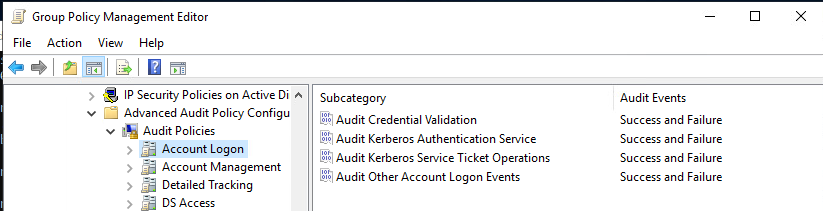
In Account Logon, set all options to Success and Failure:
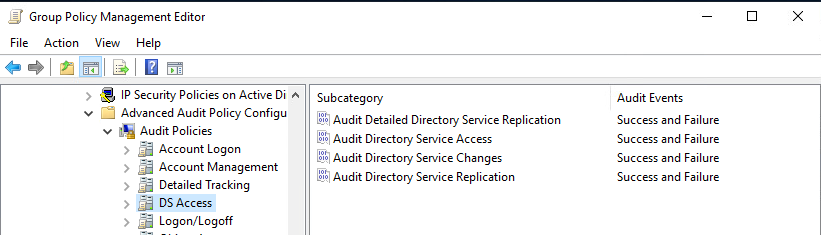
Same for DS Access:
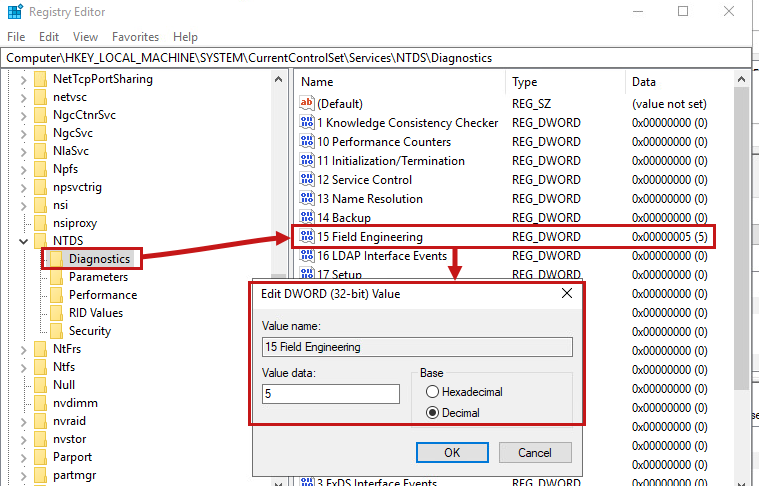
The next step is to modify the registry. In HKLM\SYSTEM\CurrentControlSet\ServicesNTDS\Diagnostics\, change the key 15 Field Engineering to 5 (verbose):
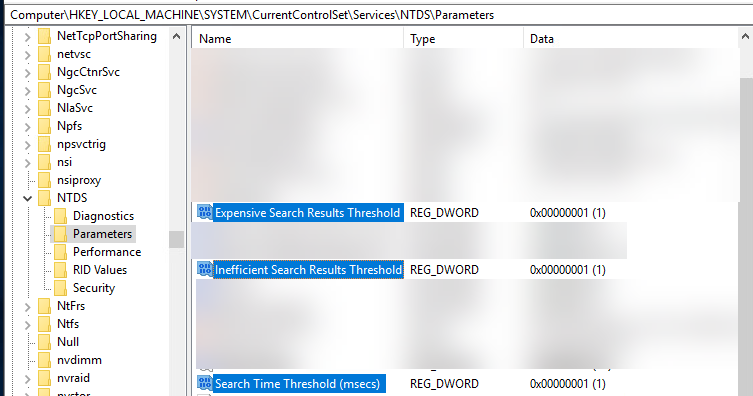
Then in HKLM\SYSTEM\CurrentControlSet\ServicesNT\Parameters\, add the following DWORDs:
- «Expensive Search Results Threshold» to 1
- «Inefficient Search Results Threshold» to 1
- «Search Time Threshold (msecs)» to 1
Sysmon
Here is the Sysmon configuration used in our lab:
* False False Sysmon AcroRd32.exe /CR;channel= C:\Program Files (x86)\Adobe\Acrobat DC\Acrobat\AcroCEF\AcroCEF.exe C:\Program Files (x86)\Common Files\Adobe\AdobeGCClient\AGSService.exe C:\Program Files (x86)\Adobe\Acrobat Reader DC\Reader\AcroCEF\RdrCEF.exe C:\Program Files (x86)\Adobe\Acrobat DC\Acrobat\LogTransport2.exe C:\Program Files (x86)\Adobe\Adobe Creative Cloud\ACC\Creative Cloud.exe C:\Program Files (x86)\Adobe\Adobe Creative Cloud\ACC\Creative Cloud.exe C:\Program Files (x86)\Adobe\Adobe Creative Cloud\CCXProcess\CCXProcess.exe C:\Program Files (x86)\Adobe\Adobe Creative Cloud\CoreSync\CoreSync.exe C:\Windows\SysWOW64\Macromed\Flash\FlashPlayerUpdateService.exe C:\Program Files (x86)\Common Files\Adobe\ARM\1.0\AdobeARM.exe C:\Program Files (x86)\Common Files\Adobe\ARM\1.0\AdobeARM.exe C:\Program Files (x86)\Common Files\Adobe\ARM\1.0\armsvc.exe C:\Program Files (x86)\Adobe\Acrobat DC\Acrobat\AdobeCollabSync.exe C:\Program Files (x86)\Common Files\Adobe\Adobe Desktop Common\HEX\Adobe CEF Helper.exe C:\Program Files (x86)\Common Files\Adobe\AdobeGCClient\AdobeGCClient.exe C:\Program Files (x86)\Common Files\Adobe\OOBE\PDApp\P6\adobe_licutil.exe C:\Program Files (x86)\Common Files\Adobe\OOBE\PDApp\P7\adobe_licutil.exe C:\Program Files (x86)\Common Files\Adobe\OOBE\PDApp\P7\adobe_licutil.exe C:\Program Files (x86)\Common Files\Adobe\OOBE\PDApp\UWA\updaterstartuputility.exe C:\Program Files (x86)\Common Files\Adobe\OOBE\PDApp\UWA\updaterstartuputility.exe "C:\Program Files\Microsoft Monitoring Agent\Agent\MonitoringHost.exe" -Embedding "C:\Program Files\Microsoft Monitoring Agent\Agent\MonitoringHost.exe" C:\Windows\system32\cscript.exe" /nologo "MonitorKnowledgeDiscovery.vbs C:\Program Files (x86)\Cisco\Cisco AnyConnect Secure Mobility Client\vpnagent.exe C:\Windows\Microsoft.NET\Framework\v4.0.30319\ngen.exe C:\Windows\Microsoft.NET\Framework64\v4.0.30319\mscorsvw.exe C:\Windows\Microsoft.NET\Framework\v4.0.30319\mscorsvw.exe C:\Windows\Microsoft.Net\Framework64\v3.0\WPF\PresentationFontCache.exe C:\Windows\Microsoft.Net\Framework64\v3.0\WPF\PresentationFontCache.exe C:\Windows\Microsoft.NET\Framework64\v4.0.30319\ngentask.exe C:\Windows\Microsoft.NET\Framework64\v4.0.30319\mscorsvw.exe C:\Windows\Microsoft.NET\Framework64\v4.0.30319\ngentask.exe C:\Windows\Microsoft.NET\Framework\v4.0.30319\mscorsvw.exe C:\Windows\Microsoft.NET\Framework\v4.0.30319\ngentask.exe C:\Windows\Microsoft.NET\Framework\v4.0.30319\ngentask.exe C:\Program Files\NVIDIA Corporation\ C:\Program Files\Realtek\ C:\Program Files\Realtek\Audio\HDA\RtkAudioService64.exe C:\Program Files (x86)\Dropbox\Update\DropboxUpdate.exe C:\Program Files (x86)\Dropbox\Update\DropboxUpdate.exe C:\Program Files\ESET\ESET Nod32 Antivirus\ekrn.exe "C:\Program Files (x86)\Google\Chrome\Application\chrome.exe" --type= "C:\Program Files\Google\Chrome\Application\chrome.exe" --type= C:\Program Files (x86)\Google\Update\ C:\Program Files (x86)\Google\Update\ C:\Program Files (x86)\RES Software\Workspace Manager\pfwsmgr.exe C:\Program Files (x86)\RES Software\Workspace Manager\respesvc64.exe C:\Program Files (x86)\Ivanti\Workspace Control\pfwsmgr.exe C:\Program Files (x86)\RES Software\Workspace Manager\ResPesvc64.exe C:\Program Files\RES Software\Workspace Manager\respesvc.exe C:\Program Files\Ivanti\Workspace Control\ResPesvc.exe C:\Program Files\Malwarebytes\Anti-Malware\mbam.exe C:\Program Files\Malwarebytes\Anti-Malware\mbamservice.exe C:\Program Files\Malwarebytes\Anti-Malware\mbamtray.exe C:\Program Files\Common Files\Microsoft Shared\ClickToRun\OfficeC2RClient.exe C:\Program Files\Common Files\Microsoft Shared\ClickToRun\OfficeClickToRun.exe C:\Program Files\Common Files\Microsoft Shared\ClickToRun\OfficeC2RClient.exe C:\Program Files (x86)\Microsoft Office\Office16\MSOSYNC.EXE C:\Program Files\Common Files\Microsoft Shared\OfficeSoftwareProtectionPlatform\OSPPSVC.EXE "C:\Program Files\Mozilla Firefox\plugin-container.exe" --channel "C:\Program Files (x86)\Mozilla Firefox\plugin-container.exe" --channel C:\Users\;\AppData\Local\Microsoft\OneDrive;\FileCoAuth.exe C:\Program Files (x86)\Sophos\Sophos Anti-Virus\Web Intelligence\swi_service.exe C:\Program Files (x86)\Sophos\Sophos Anti-Virus\Web Control\swc_service.exe C:\Program Files (x86)\Sophos\Sophos System Protection\ssp.exe C:\Program Files (x86)\Sophos\Remote Management System\RouterNT.exe C:\Program Files (x86)\Sophos\AutoUpdate\ALsvc.exe C:\Program Files (x86)\Sophos\Sophos Anti-Virus\SAVAdminService.exe C:\Program Files (x86)\Sophos\Remote Management System\ManagementAgentNT.exe C:\Program Files\Splunk\bin\ C:\Program Files\Splunk\bin\splunkd.exe C:\Program Files\Splunk\bin\splunk.exe D:\Program Files\Splunk\bin\ D:\Program Files\Splunk\bin\splunkd.exe D:\Program Files\Splunk\bin\splunk.exe C:\Program Files\SplunkUniversalForwarder\bin\ C:\Program Files\SplunkUniversalForwarder\bin\splunkd.exe C:\Program Files\SplunkUniversalForwarder\bin\splunk.exe D:\Program Files\SplunkUniversalForwarder\bin\ D:\Program Files\SplunkUniversalForwarder\bin\splunkd.exe D:\Program Files\SplunkUniversalForwarder\bin\splunk.exe C:\Windows\system32\svchost.exe -k appmodel -s StateRepository C:\Windows\system32\svchost.exe -k appmodel C:\WINDOWS\system32\svchost.exe -k appmodel -p -s tiledatamodelsvc C:\Windows\system32\svchost.exe -k camera -s FrameServer C:\Windows\system32\svchost.exe -k dcomlaunch -s LSM C:\Windows\system32\svchost.exe -k dcomlaunch -s PlugPlay C:\Windows\system32\svchost.exe -k defragsvc C:\Windows\system32\svchost.exe -k devicesflow -s DevicesFlowUserSvc C:\Windows\system32\svchost.exe -k imgsvc C:\Windows\system32\svchost.exe -k localService -s EventSystem C:\Windows\system32\svchost.exe -k localService -s bthserv C:\Windows\system32\svchost.exe -k localService -s nsi C:\Windows\system32\svchost.exe -k localService -s w32Time C:\Windows\system32\svchost.exe -k localServiceAndNoImpersonation C:\Windows\system32\svchost.exe -k localServiceNetworkRestricted -s Dhcp C:\Windows\system32\svchost.exe -k localServiceNetworkRestricted -s EventLog C:\Windows\system32\svchost.exe -k localServiceNetworkRestricted -s TimeBrokerSvc C:\Windows\system32\svchost.exe -k localServiceNetworkRestricted -s WFDSConMgrSvc C:\Windows\system32\svchost.exe -k localServiceNetworkRestricted C:\Windows\system32\svchost.exe -k localServiceAndNoImpersonation -s SensrSvc C:\Windows\system32\svchost.exe -k localServiceNoNetwork C:\Windows\system32\svchost.exe -k localSystemNetworkRestricted -p -s WPDBusEnum C:\Windows\system32\svchost.exe -k localSystemNetworkRestricted -p -s fhsvc C:\Windows\system32\svchost.exe -k localSystemNetworkRestricted -s DeviceAssociationService C:\Windows\system32\svchost.exe -k localSystemNetworkRestricted -s NcbService C:\Windows\system32\svchost.exe -k localSystemNetworkRestricted -s SensorService C:\Windows\system32\svchost.exe -k localSystemNetworkRestricted -s TabletInputService C:\Windows\system32\svchost.exe -k localSystemNetworkRestricted -s UmRdpService C:\Windows\system32\svchost.exe -k localSystemNetworkRestricted -s WPDBusEnum C:\Windows\system32\svchost.exe -k localSystemNetworkRestricted -s WdiSystemHost C:\WINDOWS\System32\svchost.exe -k LocalSystemNetworkRestricted -p -s WdiSystemHost C:\Windows\system32\svchost.exe -k localSystemNetworkRestricted C:\WINDOWS\system32\svchost.exe -k netsvcs -p -s wlidsvc C:\Windows\system32\svchost.exe -k netsvcs -p -s ncaSvc C:\Windows\system32\svchost.exe -k netsvcs -s BDESVC C:\Windows\system32\svchost.exe -k netsvcs -s BITS C:\Windows\system32\svchost.exe -k netsvcs -s CertPropSvc C:\Windows\system32\svchost.exe -k netsvcs -s DsmSvc C:\Windows\system32\svchost.exe -k netsvcs -s Gpsvc C:\Windows\system32\svchost.exe -k netsvcs -s ProfSvc C:\Windows\system32\svchost.exe -k netsvcs -s SENS C:\Windows\system32\svchost.exe -k netsvcs -s SessionEnv C:\Windows\system32\svchost.exe -k netsvcs -s Themes C:\Windows\system32\svchost.exe -k netsvcs -s Winmgmt C:\Windows\system32\svchost.exe -k netsvcs C:\Windows\system32\svchost.exe -k networkService -p -s DoSvc C:\Windows\system32\svchost.exe -k networkService -s Dnscache C:\Windows\system32\svchost.exe -k networkService -s LanmanWorkstation C:\Windows\system32\svchost.exe -k networkService -s NlaSvc C:\Windows\system32\svchost.exe -k networkService -s TermService C:\Windows\system32\svchost.exe -k networkService C:\Windows\system32\svchost.exe -k networkServiceNetworkRestricted C:\Windows\system32\svchost.exe -k rPCSS C:\Windows\system32\svchost.exe -k secsvcs C:\Windows\system32\svchost.exe -k swprv C:\Windows\system32\svchost.exe -k unistackSvcGroup C:\Windows\system32\svchost.exe -k utcsvc C:\Windows\system32\svchost.exe -k wbioSvcGroup C:\Windows\system32\svchost.exe -k werSvcGroup C:\WINDOWS\System32\svchost.exe -k wsappx -p -s ClipSVC C:\WINDOWS\system32\svchost.exe -k wsappx -p -s AppXSvc C:\Windows\system32\svchost.exe -k wsappx -s ClipSVC C:\Windows\system32\svchost.exe -k wsappx C:\Windows\system32\svchost.exe -k netsvcs C:\Windows\system32\svchost.exe -k localSystemNetworkRestricted C:\Program Files\Trend Micro\Deep Security Agent\ds_monitor.exe C:\Program Files\Trend Micro\Deep Security Agent\dsa.exe C:\Program Files\Trend Micro\Deep Security Agent\dsuam.exe C:\Program Files\Trend Micro\Deep Security Agent\Notifier.exe C:\Program Files\Trend Micro\Deep Security Agent\lib\Patch.exe C:\Program Files (x86)\Trend Micro\BM\TMBMSRV.exe C:\Program Files (x86)\Trend Micro\OfficeScan Client\TmopExtIns32.exe C:\Program Files (x86)\Trend Micro\OfficeScan Client\TmExtIns.exe C:\Program Files (x86)\Trend Micro\OfficeScan Client\TmListen.exe C:\Program Files\Windows Defender\ C:\Windows\system32\MpSigStub.exe C:\Windows\SoftwareDistribution\Download\Install\AM_ C:\Program Files\Microsoft Security Client\MpCmdRun.exe C:\Windows\system32\DllHost.exe /Processid C:\Windows\system32\SearchIndexer.exe /Embedding C:\Windows\System32\CompatTelRunner.exe C:\Windows\System32\MusNotification.exe C:\Windows\System32\MusNotificationUx.exe C:\Windows\System32\audiodg.exe C:\Windows\System32\conhost.exe C:\Windows\System32\powercfg.exe C:\Windows\System32\wbem\WmiApSrv.exe C:\Windows\System32\wermgr.exe C:\Windows\SysWOW64\wermgr.exe C:\Windows\system32\sppsvc.exe AppContainer %%SystemRoot%%\system32\csrss.exe ObjectDirectory=\Windows C:\Windows\system32\SearchIndexer.exe AppData\Local\Google\Chrome\Application\chrome.exe Root\VFS\ProgramFilesX86\Google\Chrome\Application\chrome.exe OneDrive.exe setup slack.exe AppData\Local\Microsoft\Teams\current\Teams.exe AppData\Roaming\Dropbox\bin\Dropbox.exe winlogbeat.exe packetbeat.exe C:\Program Files\ESET\ESET Nod32 Antivirus\ekrn.exe OneDrive.exe OneDriveStandaloneUpdater.exe ownCloud\owncloud.exe C:\Program Files\Palo Alto Networks\Traps\cyserver.exe udp 3389 C:\Program Files (x86)\Sophos\Sophos Anti-Virus\Web Intelligence\swi_service.exe C:\Program Files (x86)\Sophos\AutoUpdate\ALsvc.exe C:\Program Files (x86)\Sophos\Remote Management System\RouterNT.exe C:\Program Files (x86)\Sophos\Sophos Anti-Virus\Web Control\swc_service.exe C:\Program Files (x86)\Sophos\Sophos Anti-Virus\Web Intelligence\swi_service.exe C:\Program Files\Sophos\Sophos Network Threat Protection\bin\SntpService.exe AppData\Roaming\Spotify\Spotify.exe AppData\Local\SynologyDrive\SynologyDrive.app\bin\cloud-drive-ui.exe AppData\Local\SynologyDrive\SynologyDrive.app\bin\cloud-drive-daemon.exe C:\Program files (x86)\Trend Micro\OfficeScan Client\tmlisten.exe C:\Program Files (x86)\Trend Micro\BM\TMBMSRV.exe .windowsupdate.microsoft.com .windowsupdate.com wustat.windows.com go.microsoft.com .update.microsoft.com download.microsoft.com microsoft.com.akadns.net microsoft.com.nsatc.net Intel Valid Microsoft Valid C:\Windows\System32\cscript.exe scrobj.dll VSTOInstaller.exe C:\Windows\ C:\Users\;\AppData\Local\Microsoft\OneDrive;\FileCoAuth.exe C:\Users\;\AppData\Local\Microsoft\OneDrive\;\FileSyncTelemetryExtensions.dll C:\Users\;\AppData\Local\Microsoft\OneDrive;\FileCoAuth.exe C:\Users\;\AppData\Local\Microsoft\OneDrive\;\FileCoAuthLib.dll C:\Users\;\AppData\Local\Microsoft\OneDrive;\FileCoAuth.exe C:\Users\;\AppData\Local\Microsoft\OneDrive\;\OneDriveTelemetryStable.dll C:\Users\;\AppData\Local\Microsoft\OneDrive;\FileCoAuth.exe C:\Users\;\AppData\Local\Microsoft\OneDrive\;\vcruntime140.dll C:\Users\;\AppData\Local\Microsoft\OneDrive;\FileCoAuth.exe C:\Users\;\AppData\Local\Microsoft\OneDrive\;\UpdateRingSettings.dll C:\Users\;\AppData\Local\Microsoft\OneDrive;\FileCoAuth.exe C:\Users\;\AppData\Local\Microsoft\OneDrive\;\LoggingPlatform.dll C:\Users\;\AppData\Local\Microsoft\OneDrive;\FileCoAuth.exe C:\Users\;\AppData\Local\Microsoft\OneDrive\;\FileCoAuth.exe C:\Windows\System32\svchost.exe C:\Windows\System32\wininit.exe C:\Windows\System32\csrss.exe C:\Windows\System32\services.exe C:\Windows\System32\winlogon.exe C:\Windows\System32\audiodg.exe C:\Windows\System32\dwm.exe C:\Windows\System32\csrss.exe Google\Chrome\Application\chrome.exe C:\Windows\System32\wbem\WmiPrvSE.exe C:\Program Files\Adobe\Adobe Creative Cloud Experience\libs\node.exe C:\Program Files;\Common Files\Adobe\AdobeGCClient\AGMService.exe C:\Program Files (x86)\Adobe\Acrobat DC\Acrobat\Acrobat.exe C:\Program Files (x86)\Adobe\Acrobat DC\Acrobat\AcroCEF\AcroCEF.exe C:\Program Files (x86)\Common Files\Adobe\ARM\1.0\AdobeARMHelper.exe C:\Program Files\Adobe\Adobe Photoshop 2021\Photoshop.exe C:\Program Files\Autodesk\Autodesk Desktop App C:\Program Files (x86)\Autodesk\Autodesk Desktop App C:\Windows\CarbonBlack\cb.exe C:\Program Files\Cisco\AMP\;sfc.exe C:\Users\;\AppData\Local\Citrix\ICA Client\receiver\Receiver.exe C:\Program Files (x86)\Citrix\ICA Client\Receiver\Receiver.exe c:\Program Files\Couchbase\Server\bin\sigar_port.exe C:\Program Files;\FireEye\xagt\xagt.exe C:\Program Files (x86)\Ivanti\Workspace Control\cpushld.exe C:\Program Files (x86)\RES Software\Workspace Manager\cpushld.exe C:\Program Files\Ivanti\Workspace Control\cpushld.exe C:\Program Files\RES Software\Workspace Manager\cpushld.exe wmiprvse.exe GoogleUpdate.exe LTSVC.exe taskmgr.exe VBoxService.exe vmtoolsd.exe Citrix\System32\wfshell.exe C:\Windows\System32\lsm.exe Microsoft.Identity.AadConnect.Health.AadSync.Host.exe C:\Program Files (x86)\Symantec\Symantec Endpoint Protection 0x1000 0x1400 0x101400 0x101000 C:\Program Files\McAfee\Endpoint Security\Endpoint Security Platform\mfeesp.exe C:\Program Files\McAfee\Agent\x86\macompatsvc.exe C:\Users\;\AppData\Local\Microsoft\OneDrive\StandaloneUpdater\OneDriveSetup.exe C:\Program Files\Microsoft Office\root\Office16\OUTLOOK.EXE C:\Program Files\PowerToys\modules\KeyboardManager\KeyboardManagerEngine\PowerToys.KeyboardManagerEngine.exe C:\Users\;\AppData\Local\Microsoft\Teams\current\Teams.exe C:\Users\;\AppData\Local\Microsoft\Teams\current\Teams.exe C:\Program Files\Microsoft Security Client\MsMpEng.exe C:\Program Files\Windows Defender\MsMpEng.exe C:\ProgramData\Microsoft\Windows Defender\Platform\;\MsMpEng.exe C:\Program Files (x86)\Mobatek\MobaXterm\MobaXterm.exe C:\Program Files\Palo Alto Networks\Traps\cyserver.exe C:\Program Files\Qualys\QualysAgent\QualysAgent.exe C:\Program Files (x86)\Razer Chroma SDK\bin\RzSDKService.exe C:\WINDOWS\CCM\CcmExec.exe C:\Program Files\Splunk\bin\splunkd.exe C:\Program Files (x86)\VMware\VMWare Player\vmware-authd.exe C:\Program Files (x86)\VMware\VMware Workstation\vmware-authd.exe C:\Program Files\WinZip\FAHWindow64.exe C:\Program Files (x86)\Dell\CommandUpdate\InvColPC.exe C:\Windows\system32\igfxCUIService.exe C:\Program Files (x86)\Ivanti\Workspace Control\pfwsmgr.exe C:\Program Files (x86)\RES Software\Workspace Manager\pfwsmgr.exe C:\Program Files\Common Files\Microsoft Shared\ClickToRun\OfficeC2RClient.exe C:\Windows\System32\smss.exe C:\Windows\system32\CompatTelRunner.exe C:\Windows\system32\wbem\WMIADAP.EXE C:\Windows\System32\DriverStore\Temp\ C:\Windows\System32\wbem\Performance\ WRITABLE.TST \AppData\Roaming\Microsoft\Windows\Recent\ C:\$WINDOWS.~BT\Sources\SafeOS\SafeOS.Mount\ C:\WINDOWS\winsxs\amd64_microsoft-windows c:\Program Files\Microsoft Security Client\MsMpEng.exe Outlook.exe Roaming\Microsoft\Outlook\Outlook.xml c:\windows\system32\provtool.exe C:\WINDOWS\CCM\CcmExec.exe C:\Windows\CCM C:\Windows\System32\Tasks\Microsoft\Windows\PLA\FabricTraces C:\Windows\System32\Tasks\Microsoft\Windows\SoftwareProtectionPlatform\SvcRestartTask C:\Windows\System32\Tasks\Microsoft\Windows\Customer Experience Improvement Program\Server\ServerRoleUsageCollector C:\Windows\System32\Tasks\Microsoft\Windows\Customer Experience Improvement Program\Server\ServerCeipAssistant C:\Program Files (x86)\Cisco\Cisco AnyConnect Secure Mobility Client\aciseposture.exe C:\Program Files (x86)\Cisco\Cisco AnyConnect Secure Mobility Client\vpnagent.exe C:\Program Files\Cylance\Optics\CyOptics.exe C:\Program Files\Cylance\Desktop\CylanceSvc.exe Toolbar\WebBrowser Toolbar\WebBrowser\ITBar7Height Toolbar\ShellBrowser\ITBar7Layout Internet Explorer\Toolbar\Locked ShellBrowser C:\Program Files (x86)\Ivanti\Workspace Control\pfwsmgr.exe C:\Program Files\RES Software\Workspace Manager\pfwsmgr.exe C:\Program Files (x86)\Kaspersky Lab\Kaspersky Internet Security C:\Program Files\Kaspersky Lab\Kaspersky Internet Security C:\Program Files\McAfee\Endpoint Encryption Agent\MfeEpeHost.exe C:\Program Files\McAfee\Endpoint Security\Adaptive Threat Protection\mfeatp.exe C:\Program Files\McAfee\Endpoint Security\Endpoint Security Platform\mfeesp.exe C:\Program Files\Common Files\McAfee\Engine\AMCoreUpdater\amupdate.exe C:\Program Files\McAfee\Agent\masvc.exe C:\Program Files\McAfee\Agent\x86\mfemactl.exe C:\Program Files\McAfee\Agent\x86\McScript_InUse.exe C:\Program Files\McAfee\Agent\x86\macompatsvc.exe C:\Program Files\McAfee\Endpoint Security\Threat Prevention\mfeensppl.exe C:\Program Files\Common Files\McAfee\Engine\scanners C:\Program Files\Common Files\McAfee\AVSolution\mcshield.exe C:\Program Files\ownCloud\owncloud.exe C:\Program Files (x86)\ownCloud\owncloud.exe svchost.exe HKLM\SOFTWARE\Microsoft\Windows NT\CurrentVersion\Schedule\TaskCache\Tasks C:\Program Files\SentinelOne\Sentinel Agent System C:\Program Files\VMware\VMware Tools\vmtoolsd.exe HKLM\System\CurrentControlSet\Services\Tcpip\Parameters C:\Program Files (x86)\Webroot\WRSA.exe C:\Program Files\WIDCOMM\Bluetooth Software\btwdins.exe HKLM\SYSTEM\CurrentControlSet\Control\Lsa\Audit HKLM\SYSTEM\CurrentControlSet\Control\Lsa\Audit\AuditPolicy HKLM\SYSTEM\CurrentControlSet\Control\Lsa\Audit\PerUserAuditing\System HKLM\SYSTEM\CurrentControlSet\Control\Lsa\SspiCache HKLM\SYSTEM\CurrentControlSet\Control\Lsa\Kerberos\Domains HKLM\SOFTWARE\Microsoft\Windows\CurrentVersion\Policies\System\Audit OpenWithProgids OpenWithList \UserChoice \UserChoice\ProgId \UserChoice\Hash \OpenWithList\MRUList } 0xFFFF Office\root\integration\integrator.exe C:\WINDOWS\system32\backgroundTaskHost.exe C:\Program Files\Common Files\Microsoft Shared\ClickToRun\OfficeClickToRun.exe C:\Program Files\Windows Defender\MsMpEng.exe C:\Windows\SystemApps\Microsoft.Windows.Cortana_cw5n1h2txyewy\SearchUI.exe C:\Program Files\Microsoft Application Virtualization\Client\AppVClient.exe \CurrentVersion\App Paths \CurrentVersion\Image File Execution Options \CurrentVersion\Shell Extensions\Cached \CurrentVersion\Shell Extensions\Approved }\PreviousPolicyAreas \Control\WMI\Autologger\ HKLM\SYSTEM\CurrentControlSet\Services\UsoSvc\Start \Lsa\OfflineJoin\CurrentValue \Components\TrustedInstaller\Events Components\TrustedInstaller \Components\Wlansvc \Components\Wlansvc\Events HKLM\SOFTWARE\Microsoft\Windows\CurrentVersion\Installer\UserData\S-1-5-18\ \Directory\shellex \Directory\shellex\DragDropHandlers \Drive\shellex \Drive\shellex\DragDropHandlers _Classes\AppX HKLM\SOFTWARE\Microsoft\Windows\CurrentVersion\WINEVT\Publishers\ HKLM\SOFTWARE\Policies\Microsoft\SystemCertificates\Root\Certificates C:\Windows\SystemApps\Microsoft.Windows.Cortana_cw5n1h2txyewy\SearchUI.exe C:\$WINDOWS.~BT\ HKLM\System\CurrentControlSet\Services\Tcpip\Parameters C:\Windows\system32\lsass.exe HKLM\System\CurrentControlSet\Services \services\clr_optimization_v2.0.50727_32\Start \services\clr_optimization_v2.0.50727_64\Start \services\clr_optimization_v4.0.30319_32\Start \services\clr_optimization_v4.0.30319_64\Start \services\DeviceAssociationService\Start \services\BITS\Start \services\TrustedInstaller\Start \services\tunnel\Start \services\UsoSvc\Start C:\Program Files;\Common Files\Adobe\ARM\1.0\AdobeARM.exe \32B6B37A-4A7D-4e00-95F2- thsnYaVieBoda C:\Program Files;\Adobe\Acrobat Reader DC\Reader\AcroCEF\RdrCEF.exe \com.adobe.reader.rna.;\mojo C:\Program Files;\Common Files\Adobe\AdobeGCClient\AGMService.exe \gc_pipe_ C:\Program Files;\Common Files\Adobe\Creative Cloud Libraries\libs\node.exe \uv\ "C:\Program Files\Microsoft Monitoring Agent\Agent\MonitoringHost.exe" C:\Users\;\AppData\Local\Programs\Call Manager\Call Manager.exe \crashpad_;\mojo.;\uv\ C:\Program Files;\Citrix\ICA Client\SelfServicePlugin\SelfService.exe C:\Program Files;\Citrix\ICA Client\Receiver\Receiver.exe C:\Program Files;\Citrix\ICA Client\wfcrun32.exe C:\Program Files;\Citrix\ICA Client\concentr.exe C:\Users\;\AppData\Local\Citrix\ICA Client\receiver\Receiver.exe C:\Users\;\AppData\Local\Citrix\ICA Client\SelfServicePlugin\SelfService.exe C:\Program Files;\FireEye\xagt\xagt.exe C:\Program Files;\Google\Update\Install\;setup.exe \crashpad_ C:\Program Files;\Google\Chrome\Application\chrome.exe \mojo. C:\Program Files;\Google\Chrome\Application\;\Installer\chrmstp.exe \crashpad_ Vivisimo Velocity C:\Program Files;\Microsoft\Edge\Application\msedge.exe \LOCAL\mojo. C:\Program Files;\Microsoft\Edge\Application\msedge.exe \LOCAL\chrome.sync. C:\Program Files;\Microsoft\Edge\Application\msedge.exe \LOCAL\crashpad_ C:\Program Files;\Microsoft Office\root\Office16\OUTLOOK.EXE \MsFteWds C:\Users\;\AppData\Local\Microsoft\Teams\current\Teams.exe \mojo. C:\Users\;\AppData\Local\Microsoft\Teams\current\Teams.exe \chrome.sync. C:\Program Files;\Mozilla Firefox\firefox.exe \cubeb-pipe- C:\Program Files;\Mozilla Firefox\firefox.exe \chromium. C:\Program Files;\Mozilla Firefox\firefox.exe \gecko-crash-server-pipe. \SQLLocal\MSSQLSERVER \SQLLocal\INSTANCE01 \SQLLocal\SQLEXPRESS \SQLLocal\COMMVAULT \SQLLocal\RTCLOCAL \SQLLocal\RTC \SQLLocal\TMSM Program Files (x86)\Microsoft SQL Server\110\DTS\binn\dtexec.exe PostgreSQL\9.6\bin\postgres.exe \pgsignal_ Program Files\Qlik\Sense\Engine\Engine.exe C:\Program Files;\Qualys\QualysAgent\QualysAgent.exe Program Files\SplunkUniversalForwarder\bin\splunkd.exe Program Files\SplunkUniversalForwarder\bin\splunk.exe Program Files\SplunkUniversalForwarder\bin\splunk-MonitorNoHandle.exe Program Files (x86)\Trend Micro\OfficeScan\PCCSRV\CMAgent\OfcCMAgent.exe Program Files (x86)\Trend Micro\OfficeScan\PCCSRV\web\service\ofcservice.exe Program Files (x86)\Trend Micro\OfficeScan\PCCSRV\Web\Service\DbServer.exe Program Files (x86)\Trend Micro\OfficeScan\PCCSRV\web\service\verconn.exe Program Files (x86)\Trend Micro\OfficeScan\PCCSRV\WEB_OSCE\WEB\CGI\cgiOnClose.exe Program Files (x86)\Trend Micro\OfficeScan\PCCSRV\WEB_OSCE\WEB\CGI\cgiRqHotFix.exe Program Files (x86)\Trend Micro\OfficeScan\PCCSRV\LWCS\LWCSService.exe Program Files (x86)\Trend Micro\OfficeScan\PCCSRV\WSS\iCRCService.exe Program Files\Trend\SPROTECT\x64\tsc.exe Program Files\Trend\SPROTECT\x64\tsc64.exe Program Files (x86)\Trend Micro\OfficeScan\PCCSRV\web\service\osceintegrationservice.exe Program Files (x86)\Trend Micro\OfficeScan\PCCSRV\web\service\OfcLogReceiverSvc.exe \Trend Micro OSCE Command Handler Manager \Trend Micro OSCE Command Handler2 Manager \Trend Micro Endpoint Encryption ToolBox Command Handler Manager \OfcServerNamePipe \ntapvsrq \srvsvc \wkssvc \lsass \winreg \spools Anonymous Pipe c:\windows\system32\inetsrv\w3wp.exe .1rx.io .2mdn.net .adadvisor.net .adap.tv .addthis.com .adform.net .adnxs.com .adroll.com .adrta.com .adsafeprotected.com .adsrvr.org .advertising.com .amazon-adsystem.com .amazon-adsystem.com .analytics.yahoo.com .aol.com .betrad.com .bidswitch.net .casalemedia.com .chartbeat.net .cnn.com .convertro.com .criteo.com .criteo.net .crwdcntrl.net .demdex.net .domdex.com .dotomi.com .doubleclick.net .doubleverify.com .emxdgt.com .exelator.com .google-analytics.com .googleadservices.com .googlesyndication.com .googletagmanager.com .googlevideo.com .gstatic.com .gvt1.com .gvt2.com ib-ibi.com .jivox.com .mathtag.com .moatads.com .moatpixel.com .mookie1.com .myvisualiq.net .netmng.com .nexac.com .openx.net .optimizely.com .outbrain.com .pardot.com .phx.gbl .pinterest.com .pubmatic.com .quantcount.com .quantserve.com .revsci.net rfihub.net .rlcdn.com .rubiconproject.com .scdn.co .scorecardresearch.com .serving-sys.com .sharethrough.com .simpli.fi .sitescout.com .smartadserver.com .snapads.com .spotxchange.com .taboola.com .taboola.map.fastly.net .tapad.com .tidaltv.com .trafficmanager.net .tremorhub.com .tribalfusion.com .turn.com .twimg.com .tynt.com .w55c.net .ytimg.com .zorosrv.com 1rx.io adservice.google.com ampcid.google.com clientservices.googleapis.com googleadapis.l.google.com imasdk.googleapis.com l.google.com ml314.com mtalk.google.com update.googleapis.com www.googletagservices.com .mozaws.net .mozilla.com .mozilla.net .mozilla.org clients1.google.com clients2.google.com clients3.google.com clients4.google.com clients5.google.com clients6.google.com safebrowsing.googleapis.com .akadns.net .netflix.com .aspnetcdn.com ajax.googleapis.com cdnjs.cloudflare.com fonts.googleapis.com .typekit.net cdnjs.cloudflare.com .stackassets.com .steamcontent.com .arpa. .arpa .msftncsi.com .localmachine localhost C:\ProgramData\LogiShrd\LogiOptions\Software\Current\updater.exe .logitech.com C:\Program Files\Windows Defender Advanced Threat Protection\MsSense.exe -pushp.svc.ms .b-msedge.net bing.com .hotmail.com .live.com .live.net .s-microsoft.com .microsoft.com .microsoftonline.com .microsoftstore.com .ms-acdc.office.com .msedge.net .msn.com .msocdn.com .skype.com .skype.net .windows.com .windows.net.nsatc.net .windowsupdate.com .xboxlive.com login.windows.net outlook.office.com statics.teams.cdn.office.net acdc-direct.office.com .fp.measure.office.com office365.com .activedirectory.windowsazure.com aria.microsoft.com .msauth.net .msftauth.net .opinsights.azure.com management.azure.com outlook.office365.com portal.azure.com substrate.office.com osi.office.net .digicert.com .globalsign.com .globalsign.net msocsp.com ocsp.msocsp.com pki.goog .pki.goog ocsp.godaddy.com amazontrust.com .amazontrust.com ocsp.sectigo.com pki-goog.l.google.com .usertrust.com ocsp.comodoca.com ocsp.verisign.com ocsp.entrust.net ocsp.identrust.com status.rapidssl.com status.thawte.com ocsp.int-x3.letsencrypt.org subca.ocsp-certum.com cscasha2.ocsp-certum.com crl.verisign.com C:\Program Files\SentinelOne\Sentinel Agent;\SentinelAgent.exe .spotify.com .spotify.map.fastly.net C:\Windows\SystemApps\Microsoft.Windows.Search;SearchApp.exe \appdata\local\google\chrome\user data\swreporter\;software_reporter_tool.exe C:\Program Files (x86)\Google\Chrome\Application\chrome.exe NETWORK SERVICE; SERVICE ROOM AppData\Local\Microsoft\Windows\PowerShell\StartupProfileData-Interactive C:\Windows\System32\WindowsPowerShell\v1.0\powershell.exe C:\Program Files\Mozilla Firefox\firefox.exe C:\Program Files\Mozilla Firefox\updater.exe C:\Program Files\Mozilla Firefox\default-browser-agent.exe C:\Program Files\Mozilla Firefox\pingsender.exe C:\Program Files\Git\cmd\git.exe C:\Program Files\Git\mingw64\bin\git.exe C:\Program Files\Git\mingw64\libexec\git-core\git.exe C:\Program Files (x86)\Microsoft\Edge\Application\msedge.exe C:\Program Files (x86)\Microsoft\Edge\Application\ \BHO\ie_to_edge_stub.exe C:\Program Files (x86)\Microsoft\Edge\Application\ identity_helper.exe C:\Program Files (x86)\Microsoft\EdgeUpdate\Install\ Microsoft Edge x64 unknown process C:\Program Files\Microsoft VS Code\Code.exe \appdata\local\google\chrome\user data\swreporter\;software_reporter_tool.exe C:\Program Files (x86)\Google\Chrome\Application\chrome.exe NETWORK SERVICE; SERVICE ROOM