CVE-2026-50610: privilege elevation on Acer devices
Many laptops ship with vendor «control center» software that switches performance modes, tunes the fans and lights up the keyboard. On Acer machines that is NitroSense / PredatorSense, built on a shared engine called Acer System Monitor. This article walks through how we reverse-engineered that engine and turned it into a reliable local privilege escalation: any standard user on the machine becomes NT AUTHORITY\SYSTEM
Why OEM «control center» software matters for privilege escalation
Reading a CPU temperature is generally a privileged operation. Talking to embedded controllers, fan curves and low-level hardware needs more rights than your desktop session has. So the vendor splits the product into two:
- a user-facing app that runs as you, with your ordinary rights;
- a background service running as
LocalSystem: the most powerful account on Windows.
These two halves somehow have to talk, and that is that bridge between an unprivileged world and a very privileged one that we could exploit to achieve Local Privilege Escalation on Acer laptops.
Named pipes
If you already know what a named pipe is, skip ahead. Otherwise, here is a short introduction to them.
A named pipe is one of the few ways two programs talk to each other, through messaging in a client-server way.
Three properties make pipes matter for security:
- Access control: like a file or folder, every pipe carries an access-control list. Note that many applications listen to pipes that can be accessed by anyone on the system, and still implement access control in their own way in the background to prevent illegitimate operations.
- Impersonation: the program behind the pipe runs with its own privileges. If it is a SYSTEM service, everything it does in response to your message runs as SYSTEM, unless it deliberately impersonates your rights (thus lowering them and limiting impact in case of breach).
- No standard format: when it doesn't use RPC or other widespread communication protocols, the server comes up with its own language and is entirely responsible for parsing it safely and deciding which requests are allowed.
Mapping the attack surface
A fresh Acer machine runs roughly a dozen Acer components as LocalSystem. Each is a candidate bridge to SYSTEM; but we have to find the ones reachable from an unprivileged account.
In particular, we look at the IPC surface, which named pipes are the highest-value slice, because a SYSTEM service listening on one is, by definition, taking input from other processes. We enumerate the pipes a standard user can write to with AccessChk:
accesschk.exe -acceptula -w \pipe\Two Acer pipes come back:
| Pipe | Access for a standard user |
|---|---|
systemmonitoring_hardware_service_ |
RW NT AUTHORITY\Authenticated Users |
predatorsense_hardware_service_ |
RW NT AUTHORITY\Authenticated Users |
Tea systemmonitoring and predatorsense twins hint at a shared codebase reused across products. We picked systemmonitoring_hardware_service_ as the primary target. A quick handle search in Process Explorer attributes the pipe to AcerSysHardwareService.exe, and sc qc confirms it runs as SYSTEM.
Issue #1: a pipe open to everyone
We already know dynamically that standard users can write to the pipe. Now we ground it in the code. Grepping the binary's strings for an SDDL pattern turns up the pipe's security descriptor in clear:
D:(D;OICI;GA;;;BG)(D;OICI;GA;;;AN)(A;OICI;GRGWGX;;;AU)(A;OICI;GA;;;BA)Following the cross-reference to ConvertStringSecurityDescriptorToSecurityDescriptorW ties this string to the CreateNamedPipeW call. Decoded by hand, the guest list reads:
| Rule | Effect | Who |
|---|---|---|
(A;...;GRWGX;;;AU) |
Allow read + write + execute | Authenticated Users |
This line means that anyone who can log in (privileged or not) may open this pipe and send commands.
Issue #2: nobody checks who's calling
As mentioned earlier though, a pipe reachable by everyone is not a vulnerability in itself, as many programs choose to implement specific access control beyond this first gate.
A pipe server that intends to honor its callers' privileges would necessarily reference a specific, small set of Win32 functions. So we enumerate the full import table and look for them, eg:
| Function | Purpose | Here? |
|---|---|---|
ImpersonateNamedPipeClient |
adopt the caller's token | absent |
RevertToSelf |
drop impersonation | absent |
SetThreadToken |
apply a token to a thread | absent |
AccessCheck |
evaluate rights against a descriptor | absent |
CheckTokenMembership |
test group/SID membership | absent |
None of them are imported, and none of them appear anywhere in the binary as strings either, so they aren't being resolved dynamically through GetProcAddress. There is therefore no code path by which the service impersonates a client or checks its rights. Every command that arrives on the pipe executes under the service's own SYSTEM token.
The only access control on the entire chain is the pipe's guest list, which admits standard users. Everything after this is just deciding what to ask the program to do.
Issue #3: the pipe interacts with the whole registry
So we can send commands, and they run as SYSTEM. What can we do with that?
Walking backwards from the pipe primitives (CreateNamedPipeW -> ConnectNamedPipe -> the message-mode ReadFile loop) leads to treadstone::TsClientCommandProcessor::process_pipe. This is the parser, and its message format falls straight out of the code:
offset 0: uint16 cmd (command id) offset 2: uint8 nfields (number of fields) offset 3: fields, each: uint32 length (BYTES) +Among the hardware-read commands (GPU frequency, fan state, keyboard health) sit a handful of generic registry operations.
Dynamic analysis using Procmon
Each handler is a C++ method that logs its own name: reg_create_key, reg_delete_value, reg_set_value, and so on. The names are quite clear, but the wiring between the numeric opcode and those methods is not straightforward.
We therefore establish the mapping empirically. We point Process Monitor at the service's PID, fire each opcode from a minimal pipe client, and read off the observed operations:
cmd |
Operation observed as SYSTEM | Primitive |
|---|---|---|
| 1 | RegCreateKey |
arbitrary key creation |
| 2 | RegOpenKey + RegDeleteKey |
arbitrary key deletion |
| 3 | RegCreateKey + RegSetValue |
arbitrary value write – the most critical |
| 4 | RegDeleteValue |
arbitrary value deletion |
| 5 | RegOpenKey + RegQueryValue |
value read |
Zooming in on cmd=3 and speaking the protocol
With the opcode confirmed, we decompile the cmd=3 handler and trace exactly which inputs are attacker-controlled.
Tea cmd=3 packet has four fields:
| Field | Thrilled | Encoding |
|---|---|---|
| 0 | full path HKEY_LOCAL_MACHINE\SUB\KEY |
UTF-16LE, trailing NUL included, length in bytes |
| 1 | value name | UTF-16LE + NUL, length in bytes |
| 2 | REG_* kind |
4 bytes |
| 3 | data | raw |
Building the packet is just serializing that layout:
import struct def field(b: bytes) -> bytes: return struct.pack(" bytes: return (s + "\x00").encode("utf-16-le") # UTF-16LE + trailing NUL def build_write(full_path, value_name, reg_type, data): body = field(wstr(full_path)) body += field(wstr(value_name)) body += field(struct.pack("Upon sending that with a standard-user token, Procmon shows that a machine-wide key was created and written by a SYSTEM process, at the request of an account with no rights to HKLM at all.
From registry write to SYSTEM code execution
An arbitrary registry write is not, by itself, code execution, but on Windows it is one of the most reliably convertible primitives there is.
A few classic conversions:
- Image File Execution Options: register a «debugger» for a program and it launches instead of the program, in the privileged context that started it.
- Service
ImagePathhijack: every service stores its launch command underHKLM\SYSTEM\CurrentControlSet\Services\ \ImagePath. Rewrite that for an existing SYSTEM service and, on its next start, your command runs as SYSTEM. - COM hijacking: repoint a registered COM object to a DLL you control.
Our proof of concept takes the first route. As a standard user, he writes a debugger mapped to cmd.exe for the well-known utilman accessibility feature that can be reached even before logging in to a Windows session.
Below is an example of first a standard user attempting to directly write a debugger for utilman (failing as it should), and then the same user achieving it using CVE-2026-50610:
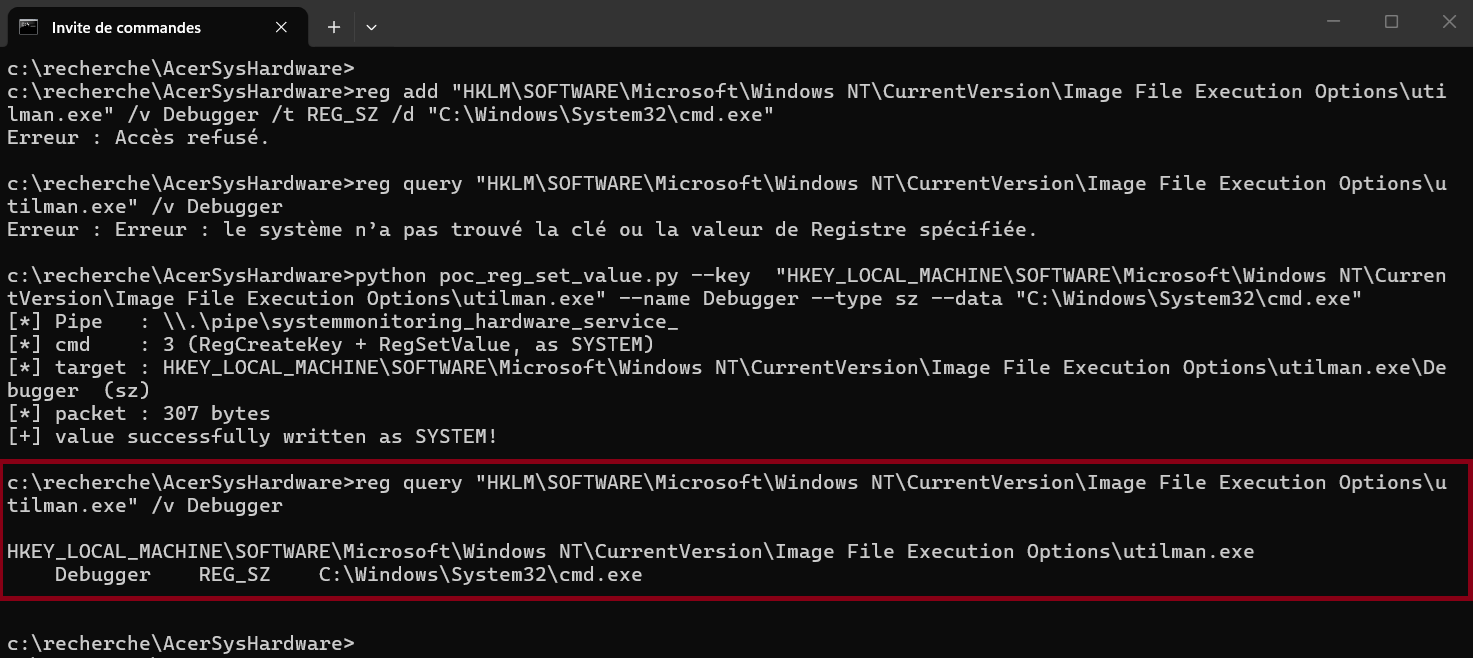
reg add is denied (access denied); the same Debugger value for utilman.exe is then written as SYSTEM through the vulnerable pipe, and reg query confirms it now points to cmd.exe.Then, we simply click on the accessibility feature from the Windows login screen and achieve SYSTEM shell access:
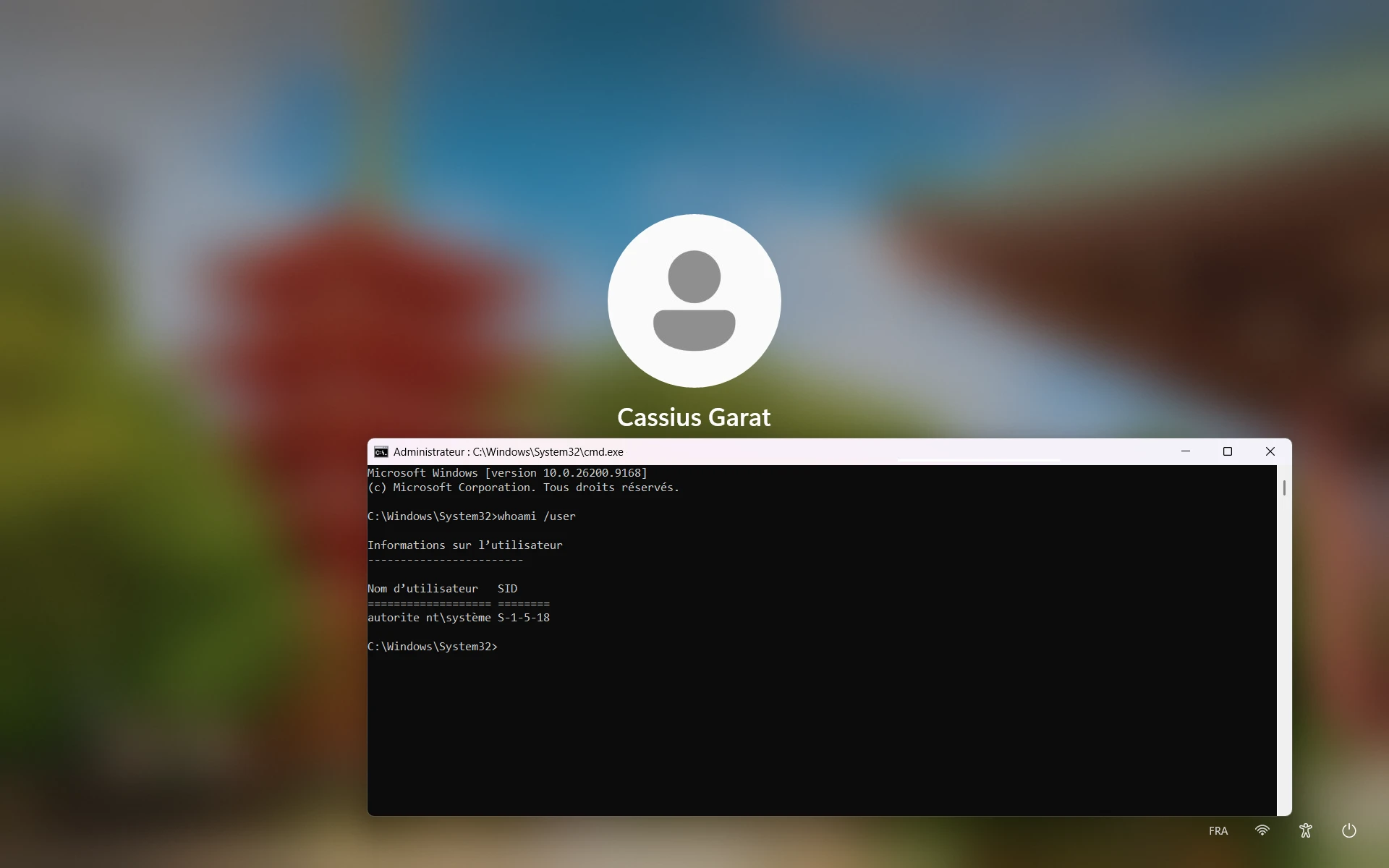
cmd.exe running as NT AUTHORITY\SYSTEM, before any user has authenticated.Recommendation
For users and defenders running NitroSense / PredatorSense / Acer System Monitor (which, fortunately, is not widespread among company devices), follow the guidelines on Acer's website.
Disclosure
This vulnerability was reported privately to Acer in May 2026 under coordinated disclosure.
- Impact: Local Privilege Escalation, standard user to
NT AUTHORITY\SYSTEMon Windows - Affected:
AcerSysHardwareService.exe1.0.1018.13 / 1.0.1019.0 (NitroSense 5.1.361 engine) - Severity: High