During a recent investigation, Intrinsic CERT encountered an issue where Fortinet FSSO logs were wrongfully attributing malicious traffic performed through the VPN to an unrelated user instead of the compromised account linked to the IP address used for this traffic.
This article aims to warn you about this issue, as to not blindly trust FortiGate logs during your digital forensics analysis.
What is Fortinet FSSO?
Fortinet FSSO (Fortinet Single Sign-On) is a feature that enables Fortinet security appliances, such as FortiGate firewalls, to identify network users based on their Active Directory credentials without requiring repeated logins or additional authentication prompts when accessing resources.
How does Fortinet FSSO work?
- The FSSO Agent monitors the authentication events on domain controllers.
- When a user logs in to the network (eg, through a Windows domain login), the agent collects the username and the user's IP address.
- The agent sends this information to the FortiGate firewall.
- Firewall policies on the FortiGate can now be applied using user or group identity (instead of source IP only), allowing for more granular, role-based security controls.
Incorrect username/IP mapping with remote connections
In VPN scenarios, dynamic IP assignment complicates reliable user/IP mapping.
Why?
- When a user connects through the VPN, a new (virtual) IP address is assigned to their session.
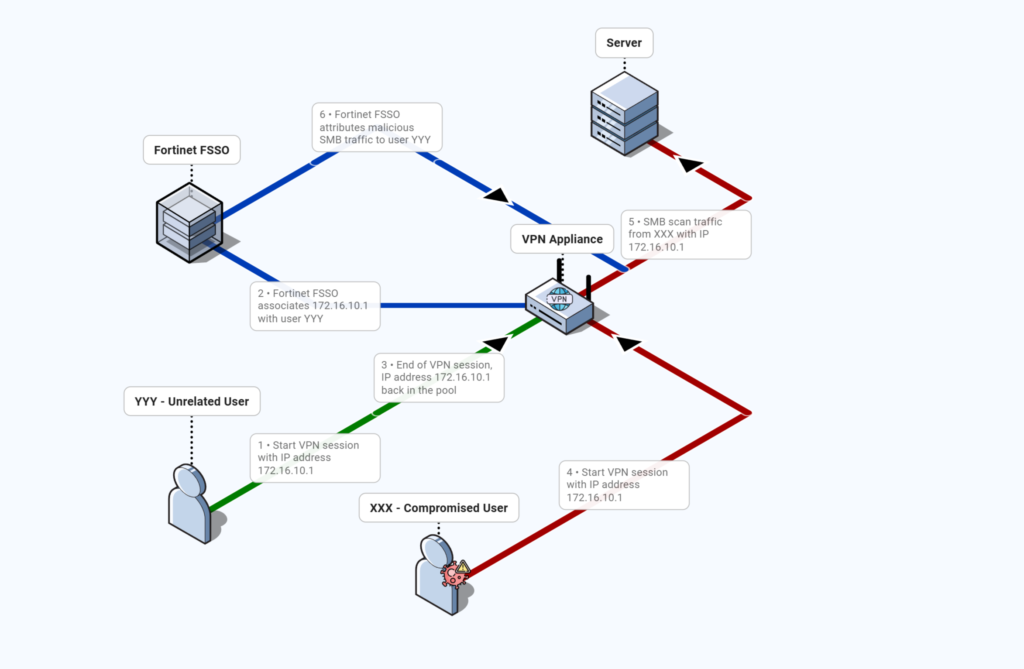
- As IP addresses assignment is dynamic, when two users connect to the VPN non-concurrently, the same IP address from the VPN pool might be reused.
- It seems that the FSSO agent does not update its username/IP mapping in that case.
The result is an outdated, incorrect or completely missing username/IP mapping for VPN-assigned IPs.
Real-World Example
During our investigations, we identified the following events:
- A malicious actor initiated a VPN connection via stolen credentials of user XXX and gets attributed the IP address 172.16.10.1 inside the network while no multi-factor authentication mechanism was set up. (see also our previous article for 5 real-world scenarios involving compromised VPNs)
- The attacker then performed a SMB scan of the internal network using the IP 172.16.10.1.
In the different logs sources, we observed:
- In the VPN logs, that the malicious session lasted from 2026-01-15 14:40:05 UTC to 2026-01-15 15:20:58 UTC.
- In the FortiGate logs, traffic where
scriptis 172.16.10.1 anddstportis 445 during the time frame of the malicious VPN sessions. - In the Windows event logs, events 5140 during the time frame of the malicious VPN sessions.
In the FortiGate FSSO logs, however, we spotted an inconsistency where there was no SMB traffic involving user XXX during the malicious VPN session. Even worse, the corresponding SMB traffic was attributed to user YYY who was not in our list of compromised accounts.
That is why it is very important, during forensics analysis, to consolidate events with different log sources and to avoid trusting, without verification, computed fields provided by security vendors.
Conclusion
Fortinet's FSSO solution is a powerful tool for automating authentication and identity-aware security policies.
However, its user/IP mapping has clear limitations in VPN contexts, since there isn't a corresponding Active Directory authentication event. This “gray area” creates attribution errors with direct impact on incident response and forensic analysis.
Adapting your monitoring and logging strategy is essential to compensate for these limitations.
About us
CERT Intrinsec is the incident response and cybersecurity research team of Intrinsec. We specialize in digital forensics, threat hunting, and incident response for complex security incidents across enterprise environments.
Our mission is to investigate real-world intrusions, expose technical blind spots, and help organizations strengthen their detection and response capabilities through actionable research and field experience.